Articles by "System Analysis and Design (SAD)"
Showing posts with label System Analysis and Design (SAD). Show all posts

Computer-aided Software Engineering (CASE) Tools

Computer-aided systems engineering (CASE) tools are the software programs that help the development team do their jobs more efficiently and more effectively. These tools support the drawing and analysis of system models. Some CASE tools also provide prototyping and code generation capabilities. Some examples are: Oracle’s Designer 2000, Rational’s Rose, Platinum’s Erwin, Popkin’s System Architect 001, and Visible System’s Visible Analyst.

At the center of any CASE tool’s architecture is a developer’s database called a CASE repository. CASE repository is a system developer’s database where developers can store system models, detailed description and specification, and other products of system development. It is also called dictionary or encyclopedia.

Around the CASE repository is a collection of tools or facilities for creating system models and documentation. These facilities generally include:
  1. Diagramming tools –These tools are used to draw system models.
  2. Dictionary tools – These tools are used to record, delete, edit, and output detailed documentation and specification.
  3. Design tools – These tools are used to construct system components including system inputs and outputs. These are also called prototyping tools.
  4. Documentation tools – These tools are used to assemble, organize, and report on system models, descriptions and specifications, and prototypes.
  5. Quality management tools – These tools are used to analyze system models, descriptions and specifications, and prototypes for completeness, consistency, and conformance to accepted rules of methodologies.
  6. Design and code generator tools – These tools automatically generate database designs and application programs or significant portions of those programs.

Computer-aided Software Engineering (CASE) Tools | SAD

Today’s CASE tools provide two distinct ways to develop system models – forward engineering and reverse engineering. Forward engineering requires the system analyst to draw system models, either from scratch or from templates. The resulting models are subsequently transformed into program code. Reverse engineering, on the other hand, allows a CASE tool to read existing program code and transform that code into a representative system model that can be edited and refined by the systems analyst. CASE tools that allow for bi-directional, forward and reverse engineering are said to provide for “round-trip engineering”.


Different Approaches to Improving Information Systems Development

Several different approaches have been developed in the continuous effort to improve the systems analysis and design process. The two important approaches are prototyping and joint application development (JAD).


Prototyping

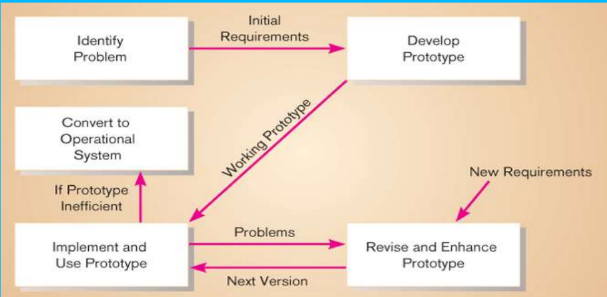
Prototyping is a form of rapid application development (RAD). Prototyping is a rapid, iterative, and incremental process of systems development in which requirements are converted to a working system that is continually revised through close work between the development team and the users. We can build a prototype with any computer language or development tool, but special prototyping tools have been developed to simply the process. A prototype can be developed with some fourth-generation language (4GL), with the query and screen and report design tools of a database management system, and with tools called computer-aided software engineering (CASE) tools.
Different Approaches to Improve Information Systems Development | SAD
Prototyping

In prototyping, the analyst works with users to determine the initial or basic requirements for the system. The analyst then quickly builds a prototype. When the prototype is completed, the users work with it and tell the analyst what they like and do not like about it. The analyst uses this feedback to improve the prototype and takes the new version back to the users. This iterative process continues until the users are relatively satisfied with what they have seen.
Ideally, the prototype serves as a mechanism for identifying information system requirements. In this case, we throw away the prototype (also called throwaway prototype) after identifying requirements. The actual information system is developed with an eye toward quality and maintainability based on the requirements.


Advantages:

  1. Useful for projects in which user requirements are uncertain or imprecise.
  2. It encourages active user and management participation.
  3. Projects have higher visibility and support because of the extensive user involvement.
  4. Users and management see working, software-based solutions more rapidly.
  5. Errors and omissions tend to be detected earlier in prototypes.
  6. Testing and training are natural by-products.
  7. It is more natural process.
  8. It is most popular for small to medium-size projects.


Disadvantages:

  1. It increases lifetime cost to operate, support and maintain the system.
  2. It can solve the wrong problems since problem analysis is abbreviated or ignored.
  3. The product may have less quality because of speed in development.


Developing Information Systems and System Development Life Cycle (SDLC)

Most organizations use a standard set of steps, called a systems development methodology to develop and support their information systems. It is a standard process followed in an organization to conduct all the steps necessary to analyze, design, implement, and maintain information systems. And systems development life cycle (SDLC) is the traditional methodology used to develop, maintain, and replace information systems. It includes different phases as shown in the figure below. This representation of SDLC is sometimes referred to as the waterfall model or classic life cycle.
 
Developing Information Systems and System Development Life Cycle (SDLC)
Fig: The systems development life cycle

The first phase is called planning. In this phase, someone identifies the need for a new or enhanced system. These needs are then analyzed, prioritized and arranged into a plan for the IS department. Here, a potential information systems project is explained and an argument for continuing or not continuing with the project is presented; a detailed plan is also developed for conducting the remaining phases or the SDLC for the proposed system.
The next phase is called analysis. During this phase, the analyst studies the current system and proposes alternative replacement systems. Here, the analyst thoroughly studies the organization’s current procedures and the information systems used to perform organizational tasks. The analyst work with users to determine what the users want from a proposed system. The analyst carefully studies any current systems, manual and computerized, that might be replaced or enhanced as part of this project. The analyst studies the requirements and structures them according to their interrelationships and eliminates any redundancies; generates alternative initial designs to match the requirements; compare these alternatives to determine which best meets the requirements within the cost, labor, and technical levels the organization is willing to commit to the development process. The output of this phase is a description of the recommended alternative solution. Once the recommendation is accepted by owners, you can begin to make plans to acquire any hardware and system software necessary to build or operate the system as proposed.
The next phase is called design. During this phase, you convert the description of the recommended alternative solution into logical and then physical system specification. Here, you must design all aspects of the system form input and output screens to reports, databases, and computer processes. Logical design is the part of the design process that is independent of any specific hardware or software platform. Theoretically, the system could be implemented on any hardware and systems software. Physical design is the part of the design phase in which the logical specifications of the system from logical design are transformed into technology-specific details from which all programming and system construction can be accomplished.
The next phase is called implementation. In this phase, the information system is coded, tested, installed, and supported in the organization. During coding, programmers write the programs that make up the information system. During testing, programmers and analysts test individual programs and the entire system in order to find and correct errors. During installation, the new system becomes a part of the daily activities of the organization. Implementation activities also include initial user support such as the finalization of documentation, training programs, and ongoing user assistance.
The final phase of SDLC is called maintenance. In this phase, information system is systematically repaired and improved. When a system is operating in an organization, users sometimes find problems with how it works and often think of better ways to perform its functions. Also the organization’s needs with respect to the system change over time. In maintenance, you make the changes that users ask for and modify the system to reflect changing business conditions. Waterfall model is the oldest and the most widely used paradigm for information systems development. While it does have weaknesses, it is significantly better than a haphazard approach. This model is suitable for the projects in which user requirements are certain and precise. The problems that are sometimes encountered with the linear sequential model are:
Changes can cause confusion as the project team proceeds.
It is often difficult for the customer to state all requirements explicitly. The linear sequential model requires this and makes difficulty to respond to changing customer requirements.
A working version of the system will be available to customers late in the project time-span. A major blunder, if undetected until the working program is reviewed, can be disastrous.
The linear nature of the classic life cycle leads to “blocking states” in which some project team members must wait for other members of the team to complete dependent tasks.
User involvement is limited.


Preparing Career as a Systems Analyst

System analysts are the key individuals in the information system development process. To succeed as a system analyst, you will need to develop the following skills.
  1. Working Knowledge of Information Technology: This is the technical skill. The analyst must be aware of both existing and emerging information technology. Such knowledge can be acquired by college courses, seminars and training programs.
  2. Computer Programming Experience and Expertise: This is also a technical skill needed by systems analysts. Most system analyst need to be proficient in one or more high level programming language.
  3. General Knowledge of Business Processes and Terminology: Most of the systems today are business related and the systems analysts must be able to communicate with business experts to gain understanding of their problems and needs. So, this skill is must. To develop this skill, the system analyst should have knowledge about the courses like accounting, finance, business law and ethics, economics, manufacturing, marketing, operations management, human resource management, organizational behavior etc.
  4. General Problem-Solving Skill: The systems analyst must be able to take a large business problem, break down that problem into its component parts, analyze the various aspects of the problem, and then assemble into an improved system to solve the problem. To develop this skill, a system analyst should have knowledge about critical thinking and reasoning.
  5. Good Interpersonal Communication Skill: To know the user requirements, an analyst must be able to communicate orally and in writing. To develop this skill, the courses like business and technical writing, business and technical speaking, interviewing and listening will be effective.
  6. Good Interpersonal Relations Skill: The systems analysts should interact with all the stakeholders in the information system development project. To do this they must have this skill. To improve this skill, the analyst should have knowledge about the courses like teamwork, principles of persuasion, managing change and conflict, and leadership.
  7. Flexibility and Adaptability: No two projects are alike. So, a successful system analyst must learn to be flexible and to adapt to unique challenges and situations.
  8. Character and Ethics: The system analyst should have strong character and a sense of right and wrong. This is needed to hide the sensitive and confidential facts and information of an organization.
  9. System Analysis and Design Skill: All systems analysts should know concepts and principles, tools, and techniques of information systems development.


Information System Stakeholders, Vendors and Consultants

Information System Stakeholders

A stakeholder is any person who has an interest in an existing or proposed information system. She/he may be technical or non-technical and internal or external worker. Stakeholders are also called information workers. An information worker involves in creating, collecting, processing, distributing and using information.
There are six groups of stakeholders and each group has a different role in the same information system. But in practice, any individual person may play more than one role. For example, a system analyst may also work as a system designer. The six groups are: system owners, system users, system designers, system builders, system analysts and project managers, and information technology vendors and consultants.

System owners

System owners are the information system’s sponsors and chief advocates. They are usually responsible for funding the project of development, operate, and maintain the information system. They are interested with-how much will the system cost? And how much value or what benefit will the system return to the business?
Every information system has one or more system owners. They usually come from the ranks of managers to supervisors.

System Users

These are the people who use or are affected by the information system on a regular basis. They are concerned with the system’s functionality related with their jobs and the system’s ease of learning and use. A system user may capture, validate, enter, respond, store and exchange data and information. System users are also called clients. To know business requirements, discussions with most users need to be kept.

System Designers

These are technology specialists who translate system users’ business requirements and constraints into technical solutions. These are interested in information technology choices and the design of systems within the constraints of the chosen technology. They design the computer database, inputs, outputs, screens, networks, and programs that will meet the system users’ requirements. These designs guide the construction of the final system.

System Builders

These are also technology specialists who construct information systems and components based on the design specifications generated by the system designer.


Systems Analysts and Project Managers

Systems Analyst:Although, many people in organizations are responsible for systems analysis and design, in most organizations the systems analyst has the primary responsibility. The primary role of a systems analyst is to study the problems and needs of an organization in order to determine how people, methods and information technology can best be combined to bring about improvements in the organization. System analysts identify and validate problems and needs and ensure that the technical solution fulfills these problems and needs. Systems analysts study the system and identify and validate its problems and needs for system owners and users and ensure that the technical solution fulfills the
business needs.

Project Manager: To build a good information system and applications all the stakeholders must work together as a team. Teams require leadership. For this reason, usually one or more of these stakeholders takes on the role of project manager to ensure that systems are developed on time, within budget and acceptable quality. So, project manager is responsible for planning, monitoring, and controlling projects with respect to schedule, budget, deliverables, customer satisfaction, technical standards and system quality.

Information Technology Vendors and Consultants

Most information systems are dependent on information technology that must be selected, installed and customized, integrated into business, and technically supported. This technology is developed, sold, and supported by IT vendors. Similarly, many businesses rely on external consultants to help them develop or acquire information systems and technology. The use of consultants may be driven by the need for specialized knowledge or skills or by an immediate need to complete a project.


Systems Analysis and Design

System analysis and design is a complex, challenging, and simulating organizational process that a team of business and systems professionals uses to develop and maintain computer-based information systems. It is an organizational improvement process Information system are built and rebuilt for organizational benefits.
An important (but not the only) result of system analysis and design is application software i.e. software designed to support organizational functions or processes such as inventory management, payroll, or mark-sheet analysis. In addition to application software, the total information system includes the hardware and systems software on which the application software runs, documentation and training materials, the specific job roles associated with the overall system, controls and the people who use the software along with their work methods.
In systems analysis and design, we use various methodologies, techniques and tools that have been developed, tested, and widely used over the years to assist people during system analysis and design.

Methodologies are comprehensive, multi step approaches to systems development that will guide your work and influence the quality of your final product: the information system. Methodologies use a standard set of steps. A methodology adopted by an organization will be consistent with its general management style. Most methodologies incorporate several development techniques.

Techniques are particular processes that will help to ensure that your work is well thought-out, complete, and comprehensible to other on the project team. Techniques also provide support for a wide range of tasks like conducting interviews, planning and managing the activities in a system development project, diagramming the system’s logic, and designing the reports that the system will generate.

Tools are typically computer programs that make it easy to use and benefit from the techniques and to faithfully follow the guidelines of the overall development methodology.
To be effective, both techniques and tools must be consistent with an organizations system development methodology. These make easy for system developers to conduct the steps in methodology.


Importance of Systems Analysis and Design

Systems analysis and design is the collection of important activities that takes place when new information systems are being built or existing ones are changed. All the activities are needed to build good information systems. The systems developed by using systems analysis and design activities fulfill the requirements of organizations’ personnel.
Furthermore, we can develop information systems easily and rapidly because there are lots of supporting methodologies, tools, and techniques. The information system can be built in the most effective way. The systems also fit into an existing environment and will be very easy to use and maintain. By following the activities involved in systems analysis and design, we can develop high quality information system within allocated budget and time.


What is an Information System?

In a simplest sense, a system that provides information to people in an organization is called information system (IS).
Information systems in organizations capture and manage data to produce useful information that supports an organization and its employees, customers, suppliers and partners. So, many organizations consider information system to be the essential one.
Information systems produce information by using data about significant people, places, and things from within the organization and/or from the external environment to make decisions, control operations, analyze problems, and create new products or services. Information is the data shaped into a meaningful form. Data, on the other hand, are the collection of raw facts representing events occurring in organizations or the environment before they have been organized and arranged into a form that people can understand and use.
The three activities to produce information in an information system are input, processing, and output. Input captures or collects raw data from within the organization or from its external environment for processing. Processing converts these raw data into the meaningful information. Output transfers this information to the people who will use it or to the activities for which it will be used. Information systems also require feedback, which is used to monitor the current information system output and compare it to the system goal.
The two types of information systems are formal and informal. Formal information systems are based on accepted and fixed definitions of data and procedures for collecting, storing, processing, disseminating, and using these data with predefined rules. Informal information systems, in contrast, relay on unstated rules.
Formal information systems can be manual as well as computer based. Manual information systems use paper-and-pencil technology. In contrast, computer-based information systems (CBIS) relay on computer hardware and software for processing and disseminating information.


Types of Information Systems

In practice there are several classes of information systems in organizations. Each class serves the needs of different types of users. These are transaction processing system (TPS), management information system (MIS), decision support system (DSS), executive information system (EIS), expert system, communication and collaboration system, and office automation system.

Transaction Processing Systems (TPSs)
These are the computerized systems that perform and records the daily routine transactions necessary to conduct business. These systems serve the operational level of the organization. Some examples include sales order entry, hotel reservation systems, payroll, employee record keeping, and shipping.
Transaction processing systems are central to a business. TPS failure for a few hours can cause a firm’s demise and perhaps other firms linked to it. Managers need TPS to monitor the status of internal operations and the firm’s relations with external environment. TPS are also major producers of information for the other types of systems.
Online transaction processing systems (OLTPS) is an interactive data processing system that involves a direct connection between TPS programs and users. As soon as a single transaction is entered into a computer system, the program interacts immediately with the user for that transaction. It is often known as the live system where there is no ime lag between data creation and its processing. A good example of this system is online ticket reservation system.

Management Information Systems (MISs)
These are the information systems at the management level of an organization and serve management-level functions like planning, controlling, and decision-making. These systems provide reports that are usually generated on a predetermined schedule and appear in prearranged format. Typically, these systems use internal data provided by the transaction processing systems. These systems are used for structured decision-making and in some cases for semi-structured decision making as well. Salary analysis and sales reporting are the examples in which MIS can be used.

Decision Support Systems (DSSs)
These systems also serve at the management level of the organization. These systems combine data and sophisticated analytical models or data analysis tools to support semi-structured and unstructured decision-making. These systems use internal information from TPS and MIS, and often information from external sources, such as current stock prices or product prices of competitors. DSS have more analytical power than other systems. Contract cost analysis is an example in which DSS can be used.

Executive Information Systems (EISs)
These systems are also called executive support systems (ESSs) and serve the strategic level of the organization. These systems are designed to address unstructured decision making through advanced graphics and communication. These systems incorporate data about external events such as new tax laws or competitors, but they also draw summarized information from internal MIS and DSS.
These systems are not designed to solve a specific problem but they provide a generalized computing and telecommunication capacity that can be applied to a changing array of problems. 5-year operating plan is an example in which EIS can be used.

Expert Systems
An expert system is an extension of DSS that captures and reproduces the knowledge and expertise of an expert problem solver or decision maker and then simulates the “thinking” or “actions” of that expert. These systems imitate the logic and reasoning of the experts within their respective fields.
Expert systems are implemented with artificial intelligence (AI) technology that captures, stores, and provides access to the reasoning of the experts.

Communication and Collaboration Systems
These systems enable more effective communications between workers, partners, customers and suppliers to enhance their ability to collaborate. These systems use network technology that allows companies to coordinate with other organizations across great distances. These systems create new efficiencies and new relationships between an organization, its customers and suppliers, and business partners redefining organizational boundaries.

Office Automation Systems
Office automation (OA) is more than word processing and spreadsheet applications. Office automation systems support the wide range of business office activities for improved work flow and communication between workers, regardless of whether or not those workers are located in the same office.
Office automation functions include word processing, spreadsheet applications, e-mails, work group computing, fax processing, work flow management etc.
Office automation systems can be designed to support both individuals and work groups. Personnel information systems are those designed to meet the needs of a single user. They are designed to boost an individual’s productivity. Work group information systems, on the other hand, are designed to meet the needs of a work group. They are designed to boost the group’s productivity.

What is System?

A system is a collection of components (subsystems) that work together to realize some objective. For example, the library system contains librarians, books, and periodicals as components to provide knowledge for its members.
What is System? | SAD
Basic System Module


Every system has three activities or functions. These activities are input, processing and output.
  1. Input: It involves capturing and assembling elements that enter the system to be processed. Inputs to the system are anything to be captured by the system from its environment. For example, raw materials.
  2. Processing: It involves transformation processes that convert input to output. For example, a manufacturing process.
  3. Output: It involves transferring elements that have been produced by a transformation process to their ultimate destinations. Outputs are the things produced by the system and sent into its environment. For example, finished products.
The system also includes other two additional activities. These activities include feedback and control.
  1. Feedback: It is data about the performance of a system. It is the idea of monitoring the current system output and comparing it to the system goal. Any variation from the goal are then fed back in to the system and used to adjust it to ensure that it meets its goal. For example, data about sales performance is feedback to a sales manager.
  2. Control: It involves monitoring and evaluating feedback to determine whether a system is moving toward the achievement of its goals. The control function then makes necessary adjustments to a system’s input and processing components to ensure that it produces proper output. For example, a sales manager exercises control when reassigning salespersons to new sales territories after evaluating feedback about their sales performance.
Theoretical approaches to systems have introduced many generalized principles. Goal setting is one such principle. It defines exactly what the system is supposed to do. There are principles concerned with system structure and behavior. System boundary is one such a principle. This defines the components that make up the system. Anything outside the system boundary is known as system environment. A system can be made up of any number of subsystems. Each subsystem carries out part of the system function i.e. part of the system goal. The subsystems communicate by passing messages between themselves. 
Several systems may share the same environment. Some of these systems may be connected to one another by means of a shared boundary, or interface. A system that interacts with other systems in its environment is called open system. Finally, a system that has the ability to change itself or environment in order to survive is called an adaptive system.